
A travel insurance claim electronic signature can be a typed name accepted by the form, a checkbox plus portal consent, a drawn signature, a DocuSign workflow, or a scanned image of a handwritten signature. Those methods are not automatically interchangeable. Use the method authorized by the exact insurer, administrator, form, and document.
This U.S.-focused guide explains how to match the signer, authority, method, date, declaration, and proof of submission. It does not provide legal advice or guarantee that a particular signature will be accepted.
Build a signature matrix before completing the packet
Create one row for every signature-bearing document: claim form, claimant statement, medical authorization, physician form, assignment, payment authorization, appeal, affidavit, or representative form. Add columns for required signer, signer capacity, permitted method, date format, witness or notary, and receipt.
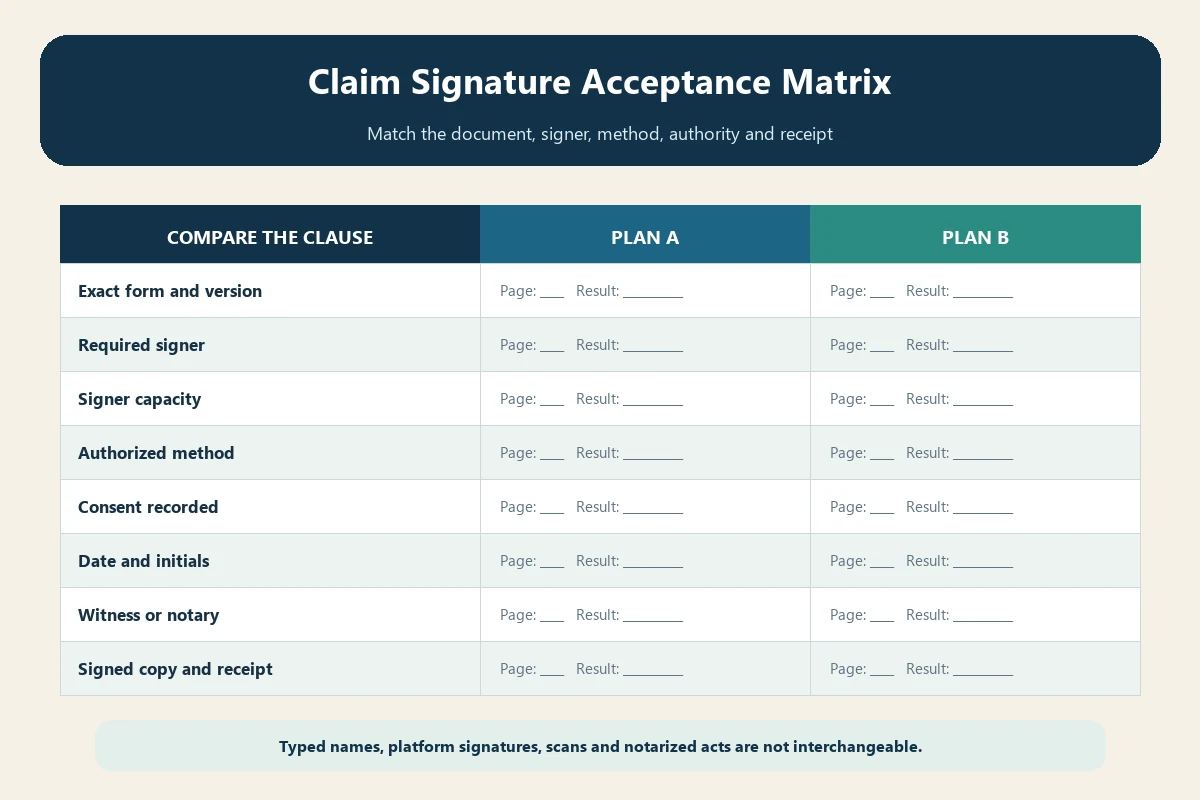
A packet can contain several valid signature methods because each form serves a different function.
Read the declaration beside the signature field
Do not infer acceptance from a fillable text box alone. Look for language saying that typing a name, checking a consent box, clicking “Finish,” or using the portal constitutes an electronic signature. Record the form title, version, and date.
A current Berkshire Hathaway Travel Protection trip claim form states that checking its agreement box and typing a name constitutes an electronic signature and consent to file electronically. That language applies to that form, not every insurer document.
Distinguish typed, drawn, platform, and scanned signatures
- Typed name: text entered where the form expressly treats it as signature.
- Drawn e-signature: a mark created by mouse, stylus, or finger in an authorized field.
- Platform signature: an authenticated workflow recording consent and completion.
- Scanned wet signature: an image or PDF copy of a form signed by hand.
- Signature image pasted into a PDF: a reusable image with weaker context unless the recipient allows it.
Ask which method is accepted when instructions are silent. Do not paste another person’s signature image.
Use the correct form version
Download the form from the administrator or authenticated portal tied to the policy. Compare product, underwriter, benefit, state, revision date, and pages. An old form from a search result may have different signature language, address, authorization, or fraud notice.
Preserve the blank version and final signed copy. Our claim document version guide explains how to retain source and submission versions.
Identify the required signer—not just the form filler
The person entering data may be the insured, claimant, purchaser, parent, guardian, executor, attorney-in-fact, broker, or helper. The form may still require the insured’s own declaration or authorization.
State the signer’s full name and capacity. If a representative signs, attach the required authority and do not describe a family relationship as legal authority by itself.
Minor child signatures need role clarity
A minor may be the insured while a parent or legal guardian signs the claim, medical release, or payment form. Age, emancipation, custody, and form instructions can affect the required signature. One parent’s authority should not be assumed where documents indicate a dispute.
Use our minor child claim guide to separate covered child, guardian, expense payer, records authorization, and benefit payee.
Incapacity may require several authorities
A health-care proxy, financial power of attorney, court guardian, insurer representative form, and HIPAA authorization can have different scopes. A person authorized to discuss status may not be authorized to sign a settlement or redirect payment.
Follow the incapacitated traveler claim workflow. Ask the administrator to identify which document supports each signature.
Death changes who may sign
A prior power of attorney commonly ends at death. An executor, administrator, beneficiary, expense payer, or survivor may have different rights. Do not sign the deceased person’s name or continue using their portal credentials.
Use the deceased traveler estate guide to document post-death capacity and payee status.
Medical authorizations are separate documents
Signing the claim form does not necessarily authorize providers to release records. Review scope, providers, dates, recipients, purpose, expiration, revocation, and redisclosure. The patient or lawful representative may need to sign.
Our medical records authorization guide provides a field-by-field review. Do not use a general claim e-signature to fill a provider’s separate authorization without permission.
Physician signatures should come from the clinician
A claimant should not type, draw, or paste a doctor’s signature. Send the correct current physician form and ask the office which secure workflow it supports. Preserve the office’s completed version and delivery record.
If the clinician refuses a proprietary form, ask the insurer whether an equivalent signed medical statement is acceptable. Do not alter clinical content or represent an unsigned note as certified.
Notarization is not ordinary e-signing
A notary verifies an act under the applicable rules; it does not prove the claim is covered or every statement is true. If notarization, witnessing, or an oath is requested, obtain the exact requirements before signing. Remote online notarization rules and cross-border recognition vary.
Use our proof-of-loss affidavit and notary guide. Do not add a decorative notary stamp to an ordinary electronic claim form.
Consent to electronic records is part of the evidence
An electronic-signature platform may ask the signer to consent to electronic records, verify an email, review disclosures, complete required fields, and click Finish. Save the completion email and signed PDF rather than only a screenshot of the signature.
WorldTrips’ claim resource center describes a DocuSign payment authorization workflow that includes consent to electronic records, required signature fields, completion, and an emailed PDF copy. It advises contacting the company if the copy does not arrive.
Preserve the platform audit trail when available
A completion certificate may record the document identifier, signer email, authentication steps, consent, timestamps, and completion status. Save it with the signed PDF, but do not assume the certificate proves authority or accuracy; it primarily documents the electronic event. If the administrator exports only a flattened copy, ask whether it retains the original audit record. Never edit the completed package to “clean up” a date or field, because that can break the connection between the signed document and its platform evidence.
Complete every required signature and initial
Some packets require signatures on the claimant declaration, privacy release, payment instruction, fraud notice, or multiple travelers’ statements. A signature on the final page may not cover an unsigned authorization.
Review required fields after signing. Digital platforms can flag missing yellow boxes; static PDFs may not. Create a checklist by page and document.
Date the signature accurately
Use the requested date format and actual signing date. Do not backdate to meet a deadline. Record time zone when a portal submission occurs near midnight or involves another country.
If the form expires after signing or facts change before submission, ask whether a fresh signature is required. Preserve both versions and explain the change.
Do not flatten evidence before saving a final copy
Some PDF tools can remove fields, signatures, certificates, or audit information when printing or optimizing. Save the platform-issued signed PDF first. Then create an upload copy only if needed and permitted.
Open the final file locally and verify every signature, checkbox, initial, date, attachment, and page. Never rely on a thumbnail.
Submit through the authorized channel
An accepted signature can still fail if the file is not attached to the right claim. Use the official portal, secure link, address, fax, or mail route and include the required policy and claim identifiers.
Follow our portal upload troubleshooting guide for file format, size, indexing, and receipt checks.
Save the signature evidence package
- Blank form version and instructions
- Electronic-record and signature consent
- Completed signed PDF
- Authority document where another person signs
- Platform completion or audit certificate if provided
- Delivery receipt and claim association
- Any acceptance, rejection, or correction response
A TravelCare claim form provides another example of language treating a typed name as the legal equivalent of a handwritten signature. Again, acceptance depends on the specific form and workflow.
Fix a rejected signature by identifying the reason
Ask whether the problem is missing field, wrong signer, unsupported method, mismatched name, absent date, expired authority, missing witness or notary, altered PDF, unreadable image, or incomplete consent. Replace only the defective component and label the new version.
Do not repeatedly paste a larger signature image if the true problem is authority or form version.
Protect against signature misuse
Use a trusted device and verified portal. Do not email reusable signature image files, passwords, or one-time codes. Review the entire document before signing and retain what you signed. Revoke delegate access when no longer needed.
If a message asks you to sign an unexpected settlement or bank-change form, verify it independently with the claims administrator.
Final signature checklist
- Correct current form and policy product
- Correct signer and stated legal capacity
- Method expressly accepted by the form or administrator
- Every required signature, initial, checkbox, and date completed
- Witness or notary requirement handled separately
- Final PDF reopened and compared with the completed form
- Consent, signed copy, authority, and receipt retained
Bottom line
Do not ask whether electronic signatures are universally valid for travel claims. Ask which person must sign this exact document, in what capacity, by which authorized method, with what additional formality, and what evidence proves completion. That document-specific approach prevents a convenient signature from becoming an avoidable intake defect.