
A travel insurance arbitration virtual hearing can present testimony, exhibits, objections, and argument without a shared physical room, but fairness depends on more than a working video link. The case needs a written protocol for identity, attendance, witnesses, exhibits, security, privacy, recording, accessibility, technical support, and connection failure.
Start with the arbitration agreement, governing rules, scheduling order, and virtual-hearing order. Confirm who hosts the platform and which directions control. This U.S. consumer guide provides general information, not legal advice.
Confirm that the hearing format is authorized
Record whether the hearing is virtual by agreement, provider rule, or arbitrator order. Identify any unresolved objection, accommodation need, time-zone problem, technology limitation, witness location issue, or fairness concern.
AAA’s 2025 consumer-rule update notes a default use of virtual hearings while preserving in-person hearings when requested by the parties or arbitrator. Retrieve the rule version governing the specific case from AAA’s current consumer rules page; do not assume the newest default controls an older agreement or pending case.
Request a written virtual-hearing protocol
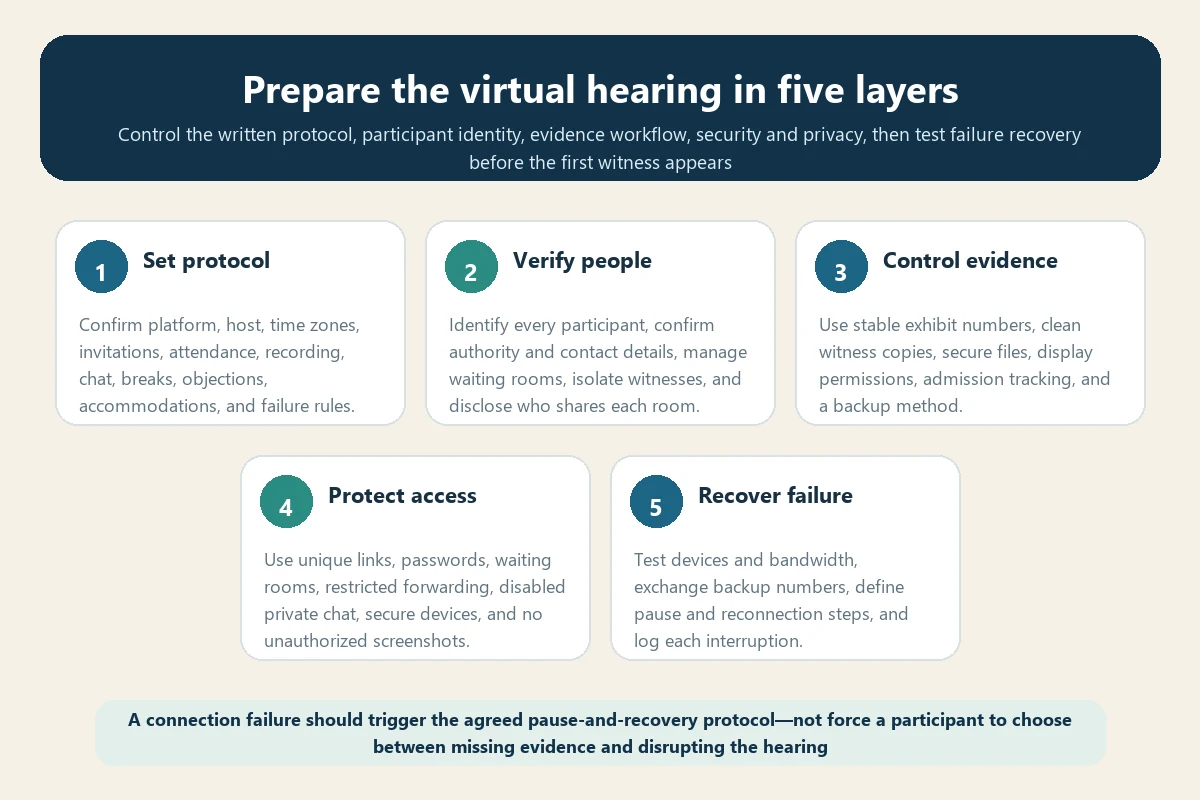
The protocol should identify platform, host, invitation process, start time and time zones, attendance, waiting room, camera expectations, witness isolation, exhibits, objections, chat, recording, transcript, breaks, private conferences, accommodations, support, and failure response.
AAA publishes a detailed model order and procedures for virtual hearings. It is a planning resource, not a substitute for the actual order in the case.
Create one participant register
| Participant | Information to confirm | Access rule |
|---|---|---|
| Arbitrator and administrator | Role, host, support contact | Authorized platform control |
| Party and representative | Name, role, email, phone, location | Main room and private consultation |
| Fact witness | Identity, time zone, availability | Waiting room until called |
| Expert witness | Role, materials, attendance order | As directed by the arbitrator |
| Reporter or interpreter | Credentials, audio, delivery | Continuous authorized access |
| Technical support | Scope, confidentiality, phone | Only as authorized |
Use clear display names and identify every person present in a participant’s physical room. Do not forward the hearing invitation to an unapproved observer.
Protect the meeting invitation
Use a unique meeting ID, strong unique password, waiting room, host-controlled admission, and restricted link distribution. Send invitations through the authorized process and verify recipients.
AAA’s official virtual hearing guide recommends password protection, controlled invitations, disabling private chat, and prohibiting unauthorized recording or screenshots. Apply the case order and current provider guidance.
Use a dedicated and updated device
Prefer a desktop or laptop with current operating system, platform software, browser, security updates, camera, microphone, charger, and enough storage. Avoid a phone or tablet as the primary device when it limits participant and exhibit visibility.
Restart before the hearing, connect power, disable sleep, close unrelated applications, pause unnecessary synchronization, and turn off pop-up notifications. Do not use a public or shared computer.
Test internet and backup connectivity
A wired connection is often more stable than Wi-Fi. Test from the actual room and at a similar time of day. Check upload and download stability, not only a single peak-speed result.
Prepare an authorized backup connection, telephone dial-in, secondary device, charger, and contact number. Confirm whether joining by phone changes identity verification, camera requirements, or exhibit access.
Build a private hearing environment
Use a quiet room with a door, neutral background, face-level camera, front lighting, and no confidential papers visible. Inform household members or colleagues that the room must remain private.
Headphones can reduce echo but may affect how the room is monitored; follow the protocol. Remove smart speakers and other devices that could listen, record, announce messages, or reveal private information.
Request accessibility before the hearing
Raise captioning, interpretation, screen-reader compatibility, enlarged documents, hearing or visual needs, scheduled breaks, assistive technology, and other accommodations early. Confirm who arranges and pays under the applicable rules and law.
Test the accommodation with the chosen platform. Automated captions may be helpful but can misstate medical, policy, and financial terminology.
Conduct a full trial run
Test camera, microphone, speakers, headphones, display name, waiting room, screen sharing, document repository, exhibit display, private consultation method, interpretation channel, captions, reporter audio, and backup connection.
FINRA’s official virtual hearing guidance recommends a quiet private location, early arrival, strong connectivity, proper lighting, muted notifications, and a Zoom trial run. FINRA procedure does not govern an AAA travel insurance case, but the operational checks are useful.
Create a stable exhibit system
Use final filenames and exhibit numbers, a searchable index, secure repository, consistent page labels, and access appropriate to each participant. Confirm who may display an exhibit and how it is offered, objected to, admitted, limited, or excluded.
Link the system to the arbitration document exchange checklist. Screen sharing does not itself place a document into evidence.
Prepare clean witness copies
Provide witnesses only the materials authorized by the order. A clean copy should not contain coaching notes, highlights, hidden comments, or annotations unless permitted.
Confirm whether the witness receives paper, secure electronic files, or both. Record delivery and instruct the witness not to open a document until directed.
Verify each witness’s room
At the start of testimony, identify the witness, location, device, people present, permitted materials, and communication channels. The arbitrator may require a camera view of the room or desk.
No unauthorized person should prompt the witness, send answers, or observe while excluded. Use the witness testimony guide to coordinate personal knowledge, exhibits, questioning, and truthful preparation.
Separate private consultation from prohibited communication
Confirm when a party may communicate privately with a representative, which breakout room or telephone may be used, and what restrictions apply during testimony. Do not message a witness while the witness is answering questions unless expressly permitted.
Disable or avoid private platform chat if the order requires. Assume written chat can create a record and reveal unintended information.
Control screen sharing
Share a single application or document rather than the entire desktop when possible. Close email, messages, unrelated files, browser tabs, password managers, and notifications before sharing.
Practice zooming, page navigation, highlighting allowed content, and stopping the share. Keep a second nonshared screen or printed index for navigation if authorized.
Follow the recording and transcript rules
Do not record, photograph, stream, or take screenshots unless the parties and arbitrator have authorized it under the governing procedure. Confirm whether the platform host records and what constitutes the official record.
Use the hearing transcript guide to distinguish forum audio, automated text, reporter rough copy, certified transcript, and the official record.
Plan objections and rulings online
Confirm how to signal an objection without speaking over the witness, how the arbitrator pauses testimony, and how rulings and exhibit status are recorded. Address the arbitrator, not the opposing party.
Maintain a live exhibit-and-ruling log. A virtual interface can make it harder to see whether everyone received the same document or heard the ruling.
Use a written disconnection protocol
Define what happens when the arbitrator, party, witness, reporter, interpreter, or representative loses audio or video. The default should protect a fair opportunity to hear, see, question, and respond.
Specify who announces the problem, whether testimony stops, the backup phone, reconnection deadline, record notation, repeat procedure, and criteria for adjournment. No substantive presentation should continue while a necessary participant cannot receive it.
Keep a technical incident log
Record time, affected participant, symptom, missed content, action taken, reconnection, repeated testimony, exhibit shown, ruling, and any unresolved prejudice. Distinguish a momentary glitch from a material interruption.
Raise the issue promptly through the authorized channel. Do not wait until after an unfavorable award to document a known problem.
Prepare for the hearing day
- Restart devices and verify power, internet, camera, microphone, and time zone.
- Open only the platform, secure repository, exhibit index, and authorized notes.
- Join early using the correct display name and waiting-room process.
- Keep support, administrator, and backup connection details available offline.
- Confirm private room, lighting, background, water, scheduled breaks, and accessibility.
- Do not begin substantive discussion before the arbitrator opens the record.
Protect the post-hearing record
After each session, save the authorized exhibit log, rulings, incident notes, transcript order, deadlines, and updated schedule. Do not retain unauthorized local recordings, screenshots, chats, or downloaded private files.
Add transcript delivery, closing argument, briefs, corrections, record closure, and award dates to the arbitration timeline.
Common virtual-hearing mistakes
- Treating a meeting link as a complete hearing protocol.
- Forwarding invitations or allowing unidentified people into the room.
- Using unstable Wi-Fi without an approved backup connection.
- Sharing a full desktop containing private messages or unrelated records.
- Letting witnesses use annotated or unauthorized materials.
- Privately messaging a testifying witness.
- Recording or taking screenshots without permission.
- Continuing while a necessary participant cannot hear or see the evidence.
Final virtual-hearing checklist
- Confirm format, current rules, written protocol, host, platform, and time zones.
- Register every participant and define access, privacy, and witness isolation.
- Test devices, connectivity, exhibits, accessibility, reporter, and backup methods.
- Protect invitations, passwords, rooms, screens, chat, recordings, and downloads.
- Use a fair disconnection protocol and contemporaneous incident log.
- Preserve only authorized records and calendar every post-hearing deadline.
Coordinate the protocol with the arbitration hearing preparation checklist and opening statement guide. A professional virtual hearing is one in which technology makes the evidence accessible without weakening identity, privacy, reliability, or either party’s opportunity to be heard.