
To correct a travel insurance complaint mistake, use the existing state insurance department case, identify the exact incorrect statement, provide the corrected fact, attach supporting evidence, and explain whether the change affects the requested review. Ask the examiner to confirm that the correction is part of the record.
Do not quietly replace a document, delete context, or file the same complaint again. A transparent correction preserves the sequence of what the department and insurer received. State portal procedures vary, so follow the regulator’s current instructions. This guide is general information, not legal advice.
Correct material errors promptly
A material error can affect jurisdiction, identity, coverage, chronology, amount, credibility, or remedy. Examples include the wrong loss date, policy number, insurer, trip cost, refund amount, medical event, quoted policy wording, submission date, document label, or statement about what the company said.
Minor spelling or formatting issues may not change review, but correct them if they create ambiguity about a person, company, policy, or event. The goal is an accurate usable record, not a cosmetically perfect narrative.
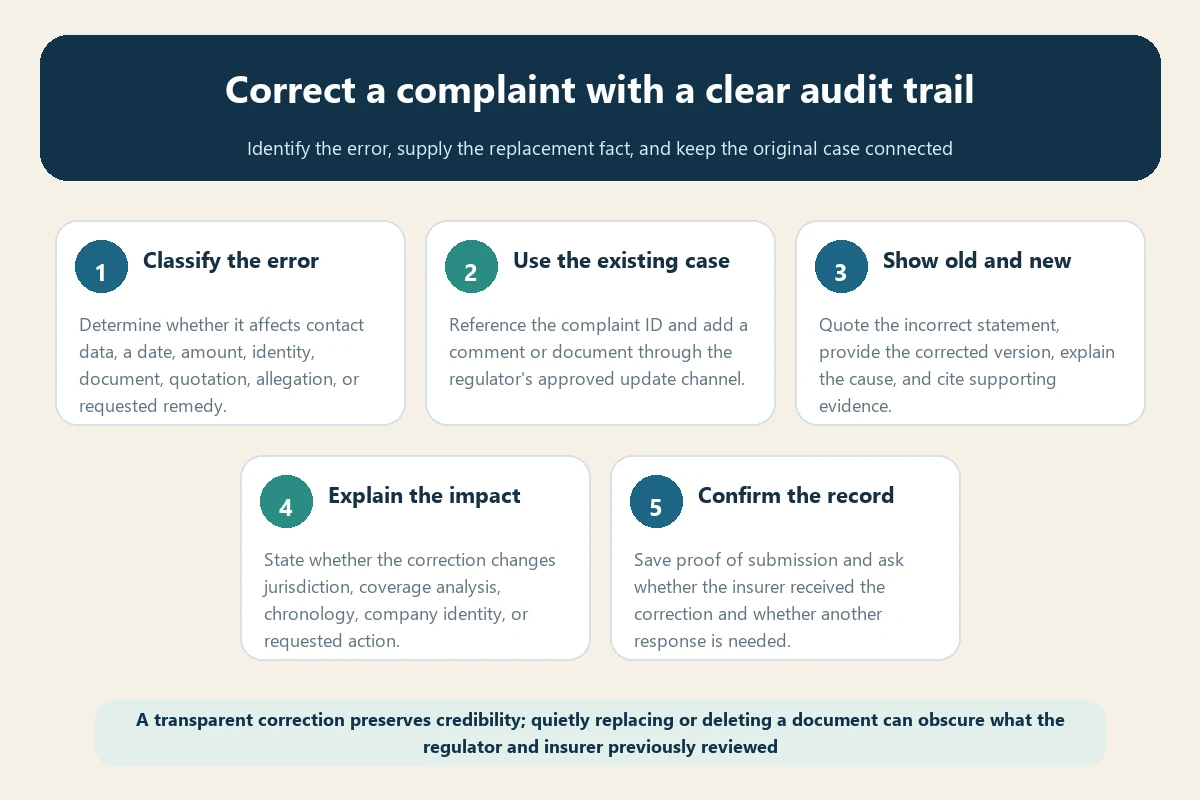
Classify the update before sending it
- Correction: replaces an inaccurate fact, statement, label, or document.
- Clarification: explains an ambiguous statement without changing the underlying fact.
- Supplement: adds new evidence or a later development.
- Contact update: changes email, phone, address, or authorized recipient.
- Withdrawal: asks the department to stop or close complaint assistance.
Use the correct label. A supplement should not pretend an earlier claim was false, and a correction should not conceal that the regulator previously received different information.
For the baseline fields the regulator normally needs—jurisdiction, legal insurer, chronology, evidence, policy language, and requested action—compare the original submission with the state travel insurance complaint filing guide.
Use the original complaint ID
Log in to the existing portal or contact the assigned examiner. Put the complaint ID, policyholder, insurer, and subject in the comment or document title. Do not start a new complaint unless the department tells you to do so.
Pennsylvania’s Consumer Services Portal FAQ explicitly says consumers should not submit multiple complaints about the same issues and should use the comment section to communicate or provide updates. It also tells users to reference the complaint ID when sending documents.
Review the official Pennsylvania Insurance Department portal FAQ as a state example.
Write the correction in old-and-new format
Make the change immediately understandable:
Re: Complaint [number] — Correction Notice. My submission dated [date] stated: “[exact incorrect statement].” The correct information is: “[replacement statement].” The error occurred because [brief accurate explanation]. Exhibit C-1 supports the corrected fact. This correction [does/does not] change my chronology, jurisdiction, policy provision, amount disputed, or requested review as follows: [concise impact]. Please add this notice and exhibit to the existing case and confirm whether the company must receive or answer the correction.
Quote only enough of the old statement to locate it. If several errors exist, use numbered corrections rather than one dense paragraph.
Attach evidence that resolves the error
Use the most authoritative record available: policy declarations, issued certificate, insurer letter, carrier notice, invoice, refund statement, medical record, portal receipt, or dated correspondence. Name it clearly, such as “C-2 Airline cancellation notice — correct flight date.”
Do not alter the source file. If highlighting is useful, submit the original and a marked working copy if permitted. Preserve metadata, original email, envelope, or download source.
Explain why the mistake occurred
A concise honest explanation protects credibility. Common causes include transposed digits, time-zone conversion, confusing booking date with travel date, using a marketing brand instead of the underwriter, relying on a pending refund amount, attaching an earlier policy version, or misreading a portal timestamp.
Do not invent an excuse or blame the insurer without evidence. If you do not know the cause, say the error was discovered during record review.
State whether the correction changes the case
Tell the examiner whether the corrected fact affects:
- The proper state or regulated entity.
- The policy period or covered event.
- A filing, notice, or proof deadline.
- The amount claimed, refunded, or unpaid.
- The insurer’s stated denial reason.
- The requested corrective action.
- The accuracy of another exhibit or timeline entry.
If it does not change your request, say so. That lets the analyst update the record without guessing.
Use the portal’s update tools
Washington’s Office of the Insurance Commissioner tells returning users they can add comments or documents at any point in the complaint process by logging in. It separately describes how users update contact information and instructs them to call for a name change.
Virginia’s Bureau of Insurance likewise tells consumers to log back into the portal, add a comment or upload a document, and submit the update. Its portal FAQ says users may add a comment or attachment after submission.
See the official Washington returning-user instructions and Virginia complaint portal guidance. Follow your own regulator’s current procedure.
Do not overwrite the audit trail
If the portal permits uploading but not editing the original complaint, that may be intentional. Add a correction notice rather than trying to make the old version disappear. The examiner may need to understand what the insurer first received and how the record changed.
Save both versions, proof of the correction, and the confirmation message. Label superseded working copies without destroying originals.
Ask whether the insurer received the correction
The department may have already transmitted the complaint. Ask whether it will forward the correction, whether the insurer must submit a supplemental response, and whether the response due date changes. Do not assume an upload automatically triggers a company notification.
The insurer not responding to a complaint guide explains why company-response timing should be measured from regulator routing and any revised due date.
Correct the insurer-facing file too
If the same mistake appears in your claim or appeal, send a separate correction through the insurer’s designated channel. State the claim number and preserve proof. A regulator portal update may not amend the company’s operational claim record automatically.
Keep the two transmissions consistent. Explain any difference in format or scope rather than creating contradictory versions.
Wrong insurer or wrong state needs special handling
A mistaken administrator, assistance provider, brand, or underwriting insurer can affect jurisdiction and routing. Give the department the issued policy pages identifying the legal insurer and ask whether it will correct the respondent or requires another filing.
If the state is wrong, use the wrong-state complaint guide to request referral or refile without losing the first submission record.
Correct an amount with a reconciliation
When trip cost, refund, credit, or claimed loss changes, provide a small reconciliation:
- Original amount submitted.
- Correct amount.
- Difference.
- Reason for the change.
- Supporting invoice, refund, credit, or payment record.
Distinguish authorized, pending, posted, reversed, and cleared transactions. Do not continue requesting money already refunded elsewhere.
Correct a quotation or allegation carefully
If you attributed words to an adjuster, agent, doctor, or examiner inaccurately, correct the quotation and identify the source. Use paraphrase when exact wording is unavailable. If an allegation depended on the error, state whether you withdraw or narrow that allegation.
Never use a correction to conceal knowingly false information. Prompt transparent correction is safer than leaving a material inaccuracy in the record.
Contact changes need a case comment too
Updating profile data may not notify the assigned investigator. Pennsylvania specifically tells users with an open matter to add a comment after account changes so the investigator is notified. Ask whether name changes, representative changes, or email changes require verification or a new authorization.
The complaint authorization form guide explains representative identity, scope, expiration, revocation, and record access.
If the complaint is already closed
Submit the correction through the status or records channel and ask whether it can be attached to the closed matter. If the error materially affected the outcome, ask about reopening, reconsideration, or another authorized process. Do not assume the closure will change automatically.
The reopen complaint guide explains how to connect new evidence or a factual error to the closure.
Verify the updated record
Confirm that the comment and attachment appear in the portal, the correct case number is shown, filenames open, pages are complete, and the examiner received notification. Save the confirmation banner or email.
Later, compare the closure and company response with the corrected fact. If they still rely on the old information, point to the correction date and exhibit.
Protect all deadlines
A correction does not necessarily extend a claim appeal, proof-of-loss duty, company response period, cancellation review, arbitration, contractual limitation, statute of limitation, or court deadline. Calendar each separately.
If the correction affects a time-sensitive filing, submit it promptly through every required process and seek qualified legal advice where needed.
Frequently asked questions
Should I withdraw and start over?
Usually ask the department first. A correction inside the existing case preserves continuity and avoids duplication. Withdrawal may have separate consequences.
Can I delete an uploaded document?
Portal capabilities vary. Contact the examiner, identify the file and reason, and ask for the approved correction process. Do not assume deletion is available or appropriate.
Will a correction hurt credibility?
A prompt, precise, supported correction generally protects credibility better than leaving a known error unaddressed. Explain the cause without exaggeration.
What if the insurer discovers the error first?
Review the issue independently, correct it if real, and answer factually. Do not defend an inaccurate statement merely because the company raised it.
Is new evidence a correction?
Not necessarily. Evidence about a later event is usually a supplement. Evidence proving an earlier statement wrong supports a correction. Label both clearly when needed.
A strong correction is visible, specific, supported, and connected to the original case. Identify the old statement, provide the replacement fact, explain why and how it matters, attach authoritative evidence, confirm transmission, and preserve the complete audit trail.