
Travel insurance claim repeated document requests can create a frustrating loop: you upload a receipt, the portal confirms it, and another message asks for the receipt again. Before resending everything, determine whether the administrator failed to receive the file, could not open it, matched it to the wrong claim, or reviewed it but still needs a fact the document does not show.
This guide gives U.S. travelers a controlled response method. It does not assume that every repeat request is improper, and it does not replace the policy or legal advice.
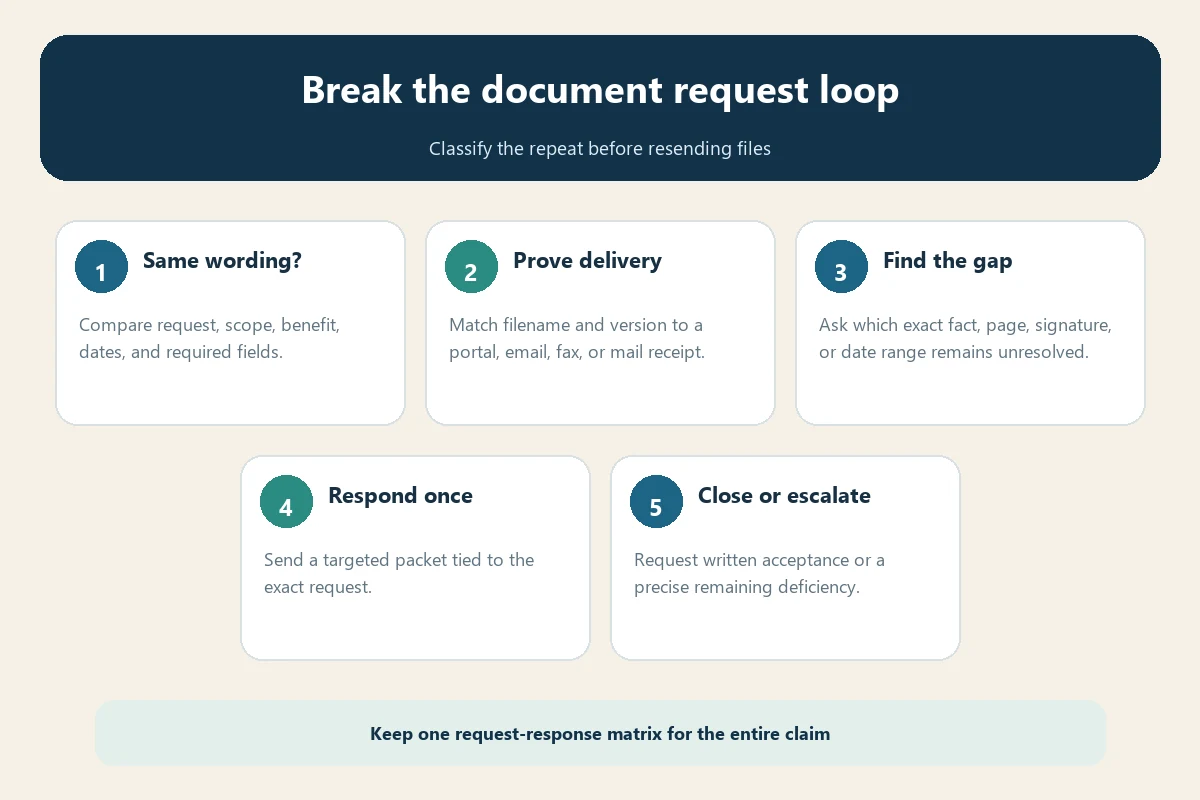
First decide whether the request is truly identical
Compare the new message with the earlier one word for word. “Hotel receipt” may become “itemized hotel folio showing taxes and payment,” while “medical record” may become “attending physician statement covering the cancellation date.” Those are narrower requests, even if the portal uses the same broad label.
Ask one precise question: What fact required to decide this benefit remains unverified? A useful answer names the missing field, date range, page, signature, payer, refund status, diagnosis, or provider. “Documents incomplete” is not sufficiently specific to correct the record.
Build a request-response matrix
Create one row for every request, including duplicates. The matrix becomes the cover sheet for your next response.
| Field | What to record |
|---|---|
| Request | Exact wording, message date, sender, deadline, and request ID |
| Document | Descriptive filename, version date, page count, and file type |
| Delivery | Portal confirmation, email ID, fax report, or tracked-mail receipt |
| Purpose | The fact the document proves and the relevant page or line |
| Review result | Received, unreadable, insufficient, superseded, accepted, or still pending |
| Next action | Replacement file, explanation, administrator clarification, or escalation |
Use stable filenames such as Claim-1234_Hotel-Folio_2026-07-14_v2.pdf. Never label five different files “receipt.pdf.” Version control prevents an older attachment from silently replacing a corrected one.
Diagnose the six common document loops
1. The file never reached the claim
An upload screen may accept a file without attaching it to the correct claim or benefit. Save the confirmation page and compare the claim number. If the portal still shows “missing,” follow the administrator’s approved alternate channel and request written confirmation. Our guide to claim portal document upload problems covers file-size, format, and browser failures.
2. The file arrived but cannot be reviewed
Photos may be cropped, blurry, upside down, password-protected, or missing reverse sides and continuation pages. Export a searchable PDF when possible, open the final file on another device, and count every page. Do not merely rename a corrupted file.
3. The document does not prove the requested fact
A booking confirmation may show an itinerary but not payment. An invoice may show a charge but not who paid it. A cancellation email may omit the refund. Pair complementary records and point to the exact evidence. For payment questions, use the bank statement proof-of-payment guide.
4. The administrator needs a different scope
A medical review may need records for a defined period rather than one visit note. A baggage claim may need both the carrier report and final carrier settlement. Ask for the exact provider, date range, traveler, expense, and benefit so you do not disclose an unlimited archive.
5. Multiple versions conflict
A revised form, corrected invoice, or newly signed authorization may coexist with the old version. State which version controls and why. List every changed field. If the claim requires a signature, follow the travel claim electronic-signature guide rather than inserting an image without checking acceptance rules.
6. The request belongs to a new review stage
An eligibility review, benefit calculation, fraud screen, coordination-of-benefits review, or payment setup can require a document already used for another purpose. Ask the examiner to identify the stage and whether the existing copy can be reused. A new use is different from a lost upload.
Send a targeted response packet
Reply by the stated deadline even if you are waiting for clarification. Put the claim number and traveler name in the subject line, then include:
- the exact request you are answering;
- the earlier submission date and delivery confirmation;
- the filename, version, and page count;
- one sentence explaining which fact appears on which page;
- the document again only if the administrator asks or cannot locate it;
- a request to confirm acceptance or identify the precise remaining deficiency.
Do not resend the entire claim archive unless instructed. A large duplicate packet can create extra versions, duplicate expenses, and another review queue. If you cannot obtain a requested record, explain why, document attempts to obtain it, and ask whether a reasonable substitute is acceptable. The original-document guide explains how to protect originals and document custody.
Use a concise response template
Re: Claim [number], request dated [date]. Your message requests [exact document]. I previously submitted [filename, version, pages] through [channel] on [date/time]; confirmation [ID] is attached. Page [x] shows [specific requested fact]. Please confirm that the file is readable and matched to this claim. If it is insufficient, please identify the missing field, page, date range, or fact and state whether a replacement or supplemental record is required. I will preserve all applicable response deadlines.
Keep the tone factual. Avoid declaring delay tactics before the claim file shows what happened. Clear questions are easier for a supervisor to audit than an angry chronology.
Protect privacy without breaking the evidence chain
Submit through an approved secure channel. Redact only information unrelated to the requested proof and never hide a name, transaction, account relationship, date, or other field needed for review. Keep an unredacted original. See the claim document redaction guide for a field-by-field method.
Do not email medical records or full financial statements to an address you have not verified in the policy, claim portal, or administrator’s official website.
Know when to escalate the loop
Escalate internally when the same request returns after you have supplied the matrix, delivery proof, and a targeted explanation, or when no one will name the unresolved fact. Ask for a supervisor or claim examiner to review the complete chronology and provide one consolidated outstanding-items list.
Request a written status: received, under review, awaiting information, approved, partially approved, denied, or closed. Our claim status follow-up guide explains how to ask without resetting the conversation.
If internal escalation fails, use the complaint instructions in the policy and the regulator for the insurer and your state. The National Association of Insurance Commissioners directory links to state insurance departments. Rules and response periods vary, so do not rely on a generic national deadline. Preserve the policy, request letters, matrix, attachments, receipts, and the administrator’s final position.
What authoritative claim guidance shows
Travel Guard’s required-document guidance organizes evidence by benefit, illustrating why a broad label may conceal a benefit-specific requirement. Travel Insured International says additional medical information may be requested when submitted documentation is incomplete or insufficient to decide coverage. These examples support asking what substantive fact remains unresolved rather than assuming that any second request is a duplicate.
Travelex’s claim tips recommend explaining why a requested document is unavailable and supplying as much relevant information as possible. Always follow the current instructions from your own policy and administrator.
Work through a real document-loop example
Suppose a cancellation claim portal asks for “proof of payment.” You uploaded a hotel invoice on August 2 and received confirmation A102. On August 8, the portal repeats “proof of payment.” The second message may look identical, but the invoice proves the hotel charge, not necessarily the cardholder or final posted payment.
Your matrix should preserve the August 2 row, then add the August 8 request as a separate row. Ask whether the unresolved fact is payment status, payer identity, currency conversion, or refund status. If the examiner confirms that a card statement is needed, submit only the statement page containing the transaction plus the invoice-to-transaction reconciliation. Record the new confirmation. Do not overwrite the first row or pretend the first file supplied a fact it did not contain.
Now consider a different result: the examiner says the invoice was never attached to the claim. Resubmit the same verified file, cite confirmation A102, obtain a second receipt, and ask the examiner to confirm both readability and claim association. That is a delivery failure, not an evidence failure. The response differs even though the automated request looked the same.
Track time without inventing a universal deadline
Maintain dates for the loss, claim notice, each request, each response, each delivery confirmation, and every promised review. Check the policy and correspondence for notice, proof-of-loss, appeal, and supplemental-document deadlines. A repeated request does not automatically suspend your obligations.
When asking for a review date, state the date on which the administrator confirmed that the file was complete. If completeness is disputed, ask for a written list of every open item. Avoid claiming that all U.S. insurers must decide every travel claim within one fixed number of days; state rules, policy language, claim circumstances, and whether necessary information is outstanding can differ.
If a deadline is close and a provider has not supplied a record, respond with the records you have, your attempts to obtain the missing item, the provider’s expected date, and a request for instructions. Preserve proof that you responded rather than allowing an automated reminder to become an allegation of noncooperation.
Final checklist for repeated requests
- Compare the exact wording and scope of both requests.
- Verify claim number, benefit, traveler, and upload destination.
- Open the submitted file and confirm version, pages, and readability.
- Match every request to a filename and delivery receipt.
- State which page proves which fact.
- Ask for the precise deficiency, not a general status update.
- Respond before the deadline and document any unavailable record.
- Request one consolidated outstanding-items list.
- Escalate with a clean chronology if the identical loop continues.
A disciplined matrix turns a confusing document loop into an auditable record. It helps the examiner locate the evidence, helps you correct a real gap, and shows exactly when a repeated request remains unexplained.